Cloudflare gave me 10ms of CPU. One slide needed 1,500.
How I built an X to Instagram pipeline for EdTheStatMan that runs on free tiers, and the two storage mistakes I made on the way.
EdTheStatMan posts sports research on X. Records, odds, picks. Most of it never made it to Instagram, because rebuilding every post by hand is a chore nobody keeps up with.
So I built a bot that does it. A post goes up on X. A branded Instagram carousel lands on my phone for approval. One tap and it's live.
It costs $0 a month. Getting it there meant working around one number.

What it does
- It spots new posts. Every 5 minutes it checks @EdTheStatMan. New posts show up in Telegram with a Build button.
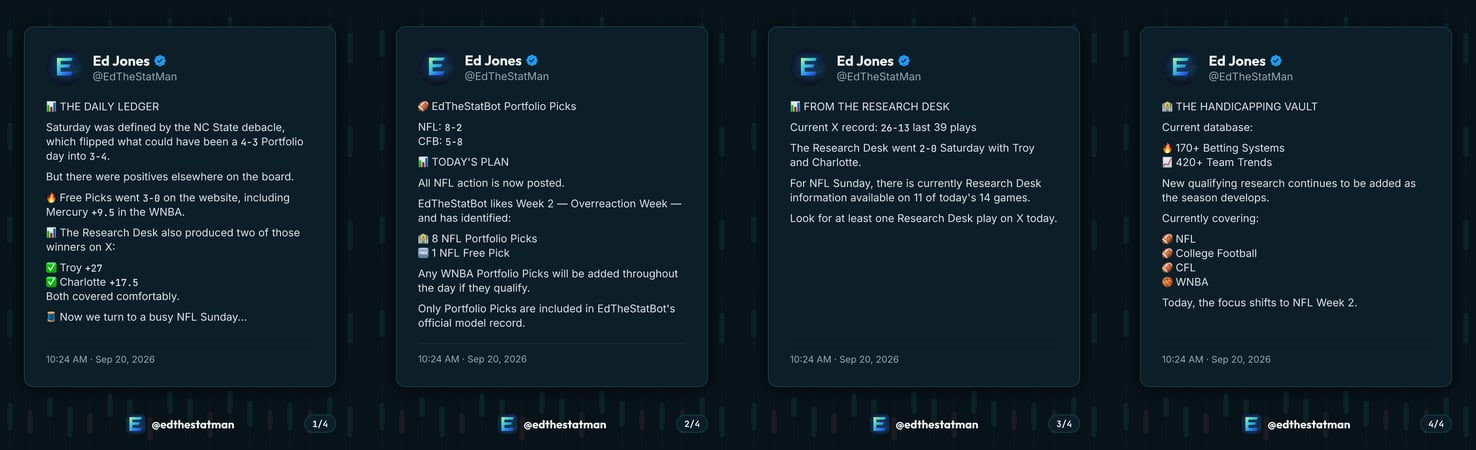
- It designs the post. The tweet becomes a 1080×1350 image in the brand's design system. A thread becomes a carousel of up to 10 slides.
- It writes the caption. AI rewrites the tweet for Instagram in the brand voice.
- A person approves it. The preview arrives in Telegram with Post, Edit caption, New caption and Reject.
- It publishes. One tap posts through Instagram's official API.
Nothing goes out without a human tapping Post. On a betting account, that part isn't optional.
The constraint
I wanted the whole thing on Cloudflare Workers. Always on, free, fast to deploy.
The problem is CPU. Laying out one slide with Satori and turning it into an image with resvg takes about 1.5 seconds of CPU. Cloudflare's free plan allows 10 milliseconds per request.
That's 150 times over budget. Per slide.
The split
Waiting on the network doesn't count against that 10ms. Only computation does. Almost everything the bot does is network calls: Telegram, Instagram, the AI caption, the database. Only the rendering is heavy.
So I split the system in two:
- An always-on Cloudflare Worker. It runs the Telegram bot, writes captions, stores state and publishes. It stays well under 10ms per request.
- An on-demand GitHub Actions job. It fetches the tweet and renders the slides. Actions are free on public repos and have no 10ms limit.
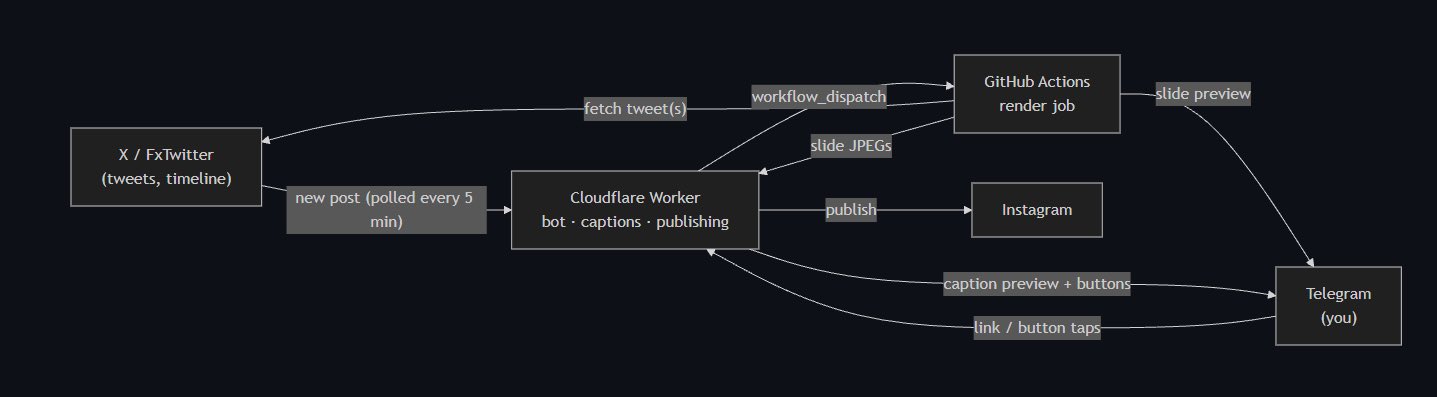
The cost is speed. A GitHub runner takes about 20 to 60 seconds to start. That's fine here, because a person reviews every post anyway.
Two wrong turns
Both are in the commit history.
Images: R2 needed a card
Cloudflare's file storage, R2, asks for a credit card even on the free tier. The goal was a system that runs with no card anywhere. So slide images moved to KV, Cloudflare's key-value store. It allows 1,000 writes a day on the free plan, and each slide is one write.
Job state: KV was too slow to agree with itself
I first kept each post's status in KV too. It broke in a way that wasn't obvious.
KV is eventually consistent. A write in one Cloudflare location can take up to about 60 seconds to show up in another. The render job reports "ready" from GitHub's servers. Button taps arrive through Telegram's servers, often at a different location.
So I'd get the preview, tap Post, and the bot would answer "Already rendering." It wasn't. That location just hadn't heard yet.
The fix was moving job state to D1, Cloudflare's SQL database, where reads are always current. Images stayed in KV, because nobody reads them until minutes later.
D1 also made double posting impossible. Posting claims the job in one statement:
UPDATE jobs SET status = 'posting'
WHERE id = ? AND status = 'ready';
It only publishes if exactly one row changed. A double tap, a second phone, or a Telegram retry all hit a no-op.
The part nobody asked about
The captions are AI-written, and AI likes to invent numbers. On a betting account, an invented record is misleading. It's also a legal exposure.
So every caption goes through a check before I ever see it:
- Every number in the caption must appear in the tweet. Records, odds, times. If the AI writes a number the tweet doesn't contain, the caption is thrown out.
- Hype wording is banned. "Lock," "guaranteed," "can't lose," "free money," "risk-free" and a few more.
- One retry, then a template. If the second attempt fails too, the bot falls back to a plain template caption.
On this account, that check is the feature.
Spec sheet
| Bot, publishing, cron | Cloudflare Workers |
| Job state | Cloudflare D1 |
| Slide images | Cloudflare KV |
| Captions | Workers AI, Llama 3.3 70B |
| Rendering | Satori and resvg on GitHub Actions |
| Interface | Telegram |
| Publishing | Instagram API with Instagram Login |
| Monthly cost | $0 |
| First commit to first live post | Under two hours, same day |
What it doesn't do yet
- Video. Video tweets aren't turned into Reels.
- Official tweet data. Reading from X's official API costs money, so it uses X's embed endpoint and FxTwitter. Both are free and unofficial. If either breaks, I get an alert and can still paste links by hand.
The code is public. The artifact link below goes straight to it.